Posts

Final Portfolio

Image
  Artistic Statement Even though this was the longest project I have ever done the entire semester, I really enjoyed it. I mainly focused on three colors: yellow, blue and pink. Yellow is for the Adobe Illustrator, blue is for Adobe Photoshop and pink is for Adobe InDesign. I used some different shades in different pages to make it look more colorful and creative.  While I struggled a lot throughout the semester because I have never used any of those software before or had any knowledge in art and design, this class helped me with all of these. I believe I have strong foundation in all of those software, and I got better with design than I used to a long time ago. I will gladly maintain all what I learned and learn even more in the future. Not only because I enjoyed the process of learning new things but I also because I believe it is beneficial to know those graphic designs and software skills. Finally, it's because I liked and I got more interested in it..

Business Cards

Image
 Sketches: Final Project: Artistic Statement: I find this project really interesting. I think it is an important one too for people who want to own a business or just for any employment reasons. For me, the last one is my favorite because I love how the color purple and extremely light blue combined beautifully together and the gradient as well. They fit the logo too. I like the first one too. I mainly used the rectangle frame tool to color the background and to put my logo.  

Postcard

Image
  Artistic Statement: I made a travel postcard about my country, Egypt. I enjoyed doing this project. It took me about an hour and a half. I mainly used the frame rectangle tool to place the pictures. I would click on buttons like fit content proportionally and fit content to frame for adjustment. I put some lines using the line shape tool for the stamp or the signature or just for the writing in general. I added some effects such as shadows on the text and around the tagbrush.

Animation

Image
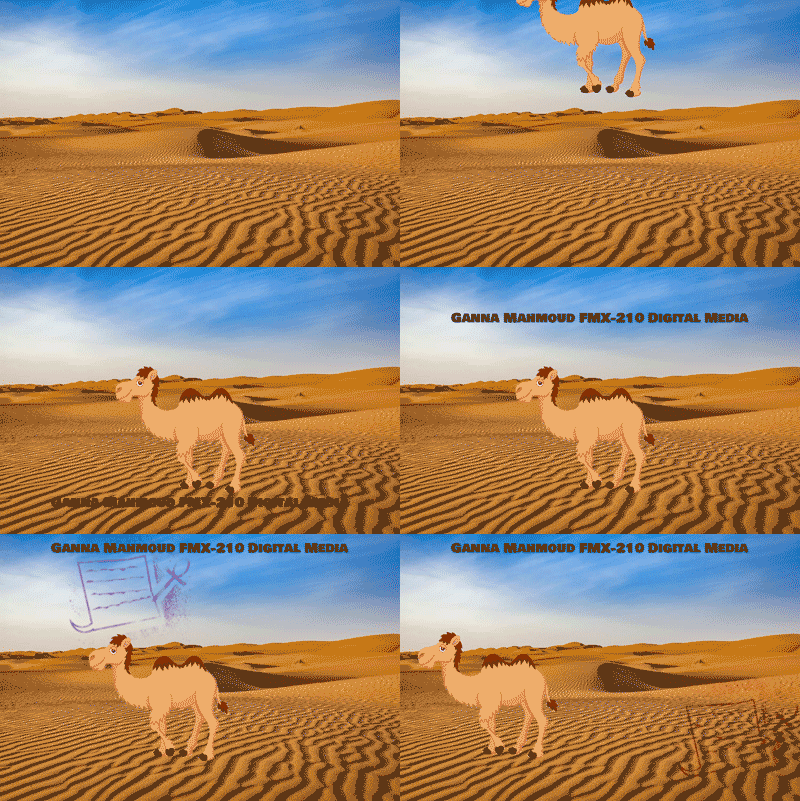
 Project: I had to redo this project because the first one did not work out. I was kind of nervous about this project, but when I watched some parts of the tutorial videos and just went ahead and gave it a try, I found it to be easy. I was trying to make that animation kind of related to my country, Egypt. In the beginning, I was trying to put and animate the pyramids instead of the camel but it was difficult because the pyramids are next to each other in almost all pictures. It would have been easier and better if each one was separated or far away, but I still decided to stick to something related to Egypt, so I picked this cute animated camel and some random desert landscape. You can also see my tag brush at the top.

InDesign Homework

First Tutorial  https://www.youtube.com/watch?v=0eqhUFRlvgI The video was easy to understand and the creator is a great explainer. I find the 'create guides' interesting so you don't have to use lines to make that. Also, you can right-click on either 'fit the frame proportionally' or 'fit the content proportionally' instead of having to go to the right side. It is quicker. I believe there is no hard tool since we covered many of them in class Second Tutorial https://www.youtube.com/watch?v=wF_fu1wcT0Y This video is great too. Before he did anything, he showed us around and give us a brief introduction of what each side too. On the right side, when we click on pages, we can click the plus button so they can be two pages next to each other. If you could not find layers or anything on the right side, you can go to the windows button at the top to activate that.  Third Tutorial  https://www.youtube.com/watch?v=2WHp9anxS1I This one I would say very detailed. I be...

Somewhere

Image
 Original Image: TV SHOW: Final Image: Artistic Statement: This was the most fun project I have done so far. It only took me an hour and thirty minutes. I picked stranger things because it is my favorite show. I loved this scene because this is the part where Eleven gets all her power back. I basically selected ' Select Mask' then I used the quick selection tool to highlight my figure as the part I want to keep. Then, I clicked on the brush with the minus sign so I can remove the background and any unwanted parts. Then, I went to adjust the brightness and contrast to make my picture's light and shade as close as possible to the movie picture. I also flipped the picture as the sunlight was coming from the left side. Finally, I posed this picture as if I were observing and looking around in the desert just like Eleven is doing here. 

Photoshop Homework 3

Image
 1. This picture will be complicated to edit or photoshop because it is already edited. I mean the speed and the light reflection coming out of Kirby. 2. This picture gives me the somewhere idea I picked it because I would really like to visit Hollywood or California one day. It is also the heart of the film industry and I would love to build my career there one day. 3. This one really made me laugh especially the second one. I just find it funny how she continued smiling while or after dropping him. 4. As someone who likes to try different photoshoot ideas. I really like the idea of this one. I believe it will be also easy to recreate

BW TO COLOR

Image
 All Three BW TO COLOR  1. 2. 3.  Artistic statement: This has to be the hardest project I have ever done. I used the quick selection tool and lasso tool to outline or highlight the part I want to color then I selected, "Select Mask," after I finished highlighting the part I want to color. After that, I selected, "Add a new layer with a mask," and then I clicked on a brush and increased size. I clicked on the part I want to color with the brush and it immediately got filled instead of having to move the brush to get stuff colored. This method did not work all the time, however. This is kind of inspired by a friend. I focused on coloring myself and color some stuff in the background. The second one is my favorite. I love the wheel of the color and how it matches perfectly with the picture.

Photoshop Logo Tagbrush

Image
 I enjoyed this project so much. I felt like it was a bit easier than Adobe Illustrator. I loved how we added many sprays to it to make it look creative and unique. My favorite part is when we embedded the logo with different colors which is basically the final part. It looked really nice. The project was easy, and I learned to use the basics of photoshop with my own hands. It was also super fun.

Photoshop 2

Image
  An image from the documentary that brought me close to my emotions would be the picture above. Even though I am not a huge fan of black-and-white landscape pictures, I do like however how the background is all white and the human and bird are black simply to highlight them as the main focus. This picture is full of life, freedom, and peace which is what everyone wants in this world. A photo where I visually express the world around me is that picture that I took in downtown Safety Harbor. Before I moved to Tampa for college, my high school friends and family would go there every weekend because of how lovely the downtown is. This picture makes me connected to the world for many reasons. First, this picture is taken during spring which is my favorite season. I love being surrounded by flowers, plants, and trees whether it's me walking by them or simply just sitting like the picture. They are decorations of the universe and art of nature. They bring me peace.

Photoshop 1

  https://www.youtube.com/watch?v=61mkx_OV61s This video was super helpful. It was not too detailed or confusing for a beginner. Most of the tools seem really easy to use since they are similar to Adobe Illustrator. I believe the only thing that will be a little difficult is the switch from Adobe to Photoshop but mostly the process seems easy. https://www.youtube.com/watch?v=ZY3Wb-llHgs This one is more complicated but it has great details that can be beneficial if I got used to using Photoshop. There’s so much that happened in this video that made it confusing. So many tabs, windows, and buttons to click. https://www.youtube.com/watch?v=IyR_uYsRdPs This one is also great, but the first video is the fastest and easiest to understand as a beginner. For this video, however, I love how he divided the course or tutorial into sections in case if I missed something or I wanted to rewatch something or focus on something specific.

Propoganda poster

Image
Original Picture: The Final (propaganda poster): Artistic Statement: I made my "propaganda" poster to raise awareness about mental health and convince people to  prioritize mental health. I know that "mental health matters," sounds cliche and generic, but I cannot stress enough how  important it is. Without mental health, life won't be settled. You won't be able to do anything if your mental health is not well. If your mental health is at risk you should definitely choose it over your career, school and etc, and give it a break. The green ribbon resembles mental health. I put the pink color to add some calmness.  Inspiration:

LOGO

Image
 Inspiration: B/W: Color: Artistic Statement:  When I was young, I disliked writing so much until I met that amazing teacher who made me fall in love with it. The paper clearly is the writing, but I wanted to add a bit of meaning and connection to the pen. This is known as Ankh, an Ancient Egyptian symbol that means life. I picked it for two reasons. First, I am Egyptian and I am very proud of my history and heritage. I picked it to symbolize life. I like to journal a lot about my life and that includes memories, accomplishments, ideas, brainstorming, planning, feelings, and so on. Overall the pen, is life, on paper.  I sketched both the pen and paper and then embedded them in Adobe Illustrator. I mostly used the pen tool except there were two times when I used circle and rectangle shapes. I used a circle to make that small circle on the pen and a rectangle to make the little curve of the paper. I did it using the shape builder tool to trim the unwanted parts of the shape...

Illustrator homework 2

Image
  Being in the state of play is to feel the current situation or the current moment. It is to allow your body to feel and connect to your surroundings. It allows your eyes to observe what it sees and your ears to hear. It is allowing your brain to be aware of the moment. Obtaining different thoughts and letting those thoughts flow instead of doubting them or overthinking them. It is to try different things and embrace failure instead of avoiding it. This is where creativity emerges and understanding of the world gets better. There are so many ways I learn new ideas or get new ideas but my top three are movies, books, and nature. For movies, it’s either rewatching the old ones or watching new ones. For the old ones, I don’t necessarily watch the entire movie all over again but rewatch my favorite clips. Imagination comes along. I imagine that I am in the scene, which is the idea or the inspiration, and add different ideas to it or just mix it with other ideas. The same goes for book...

The Calligram

Image
Digital Art and Calligarm Artistic Statement Using Adobe rush, I was trying to make a calligram of a film icon or emoji. I picked that icon because it is my dream to work in the film industry. As someone who has zero experience with Adobe Rush and not the best drawer out there, I definitely struggled a lot with drawing the shape digitally. In order to do that, I drew a rectangle and circles. I was having a hard time drawing the trapezium. At first, I tried to draw a rectangle and then tried to like manipulate or changed it into a trapezium; it did not work. I tried drawing different lines and then connecting them. It worked in making the shape but then could not fill it with color. So finally, I used the pen which was a lot easier and simpler. Doing the calligram was also confusing, I had to change the text size and distance multiple time I am happy that doing this project familiarized me more with the tools. I believe that is a good start! For me the calligram part was the most diff...

Illustrator

https://www.youtube.com/watch?v=UqjZR_v37K8&t=985s This tutorial was super simple. She did actually introduce the basic tools in illustrator and explained each one of them step by step. The rest of the tools seem pretty easy except the pen tool or any of the other drawing tools. 2. https://www.youtube.com/watch?v=AinkCNooh2A This tutorial was more detailed than the previous one. I think the hardest parts are the properties of windows like how to set them or adjust them and using keyboards to control a text or a shape. 3. https://www.youtube.com/watch?v=3GzumUieDPY This video was also super simple. I like how he was changing the shape of a triangle to any other shape by just clicking on the point. The second part where he was using a line to make any other shape seems difficult. 

Internet, Wi-fi and Bluetooth

  Internet, Wifi, and Bluetooth The Internet is considered a wire and a global network of computers that provide information and communication facilities. The internet was invented on Jan 1, 1983, by Nikola Tesla who thought of the idea of a “world wireless system.” Many scientists and engineers worked on creating the internet as well even before technology was invented, and that’s why the invention cannot be credited to just one person. Initially, it was created for government researchers to share information, but nowadays people use it to create blog websites and platforms. World Wide Web (www) is a short collection of web pages on the internet. Tim Berners-Lee invented it in 1989 to find a method for scientists to share data from their experiments. In the past, the first websites contained simple pages that have only words and pictures, but nowadays it’s made up of videos, animations, music, and quizzes. You can now access it through smartphones, smart TV, tablets, and smartwatc...

Introduction and ASCII Selfie

Image
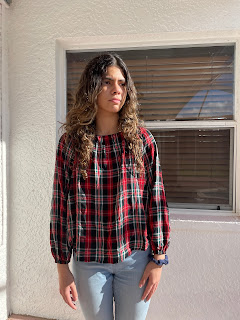
 Hi! I'm Ganna, a freshmen at University Of Tampa. I have three sisters. I am originally from Egypt, but I live in Palm Harbor, Florida with my family. I lived in US for three years so far. My hobbies include reading fiction and self development books. I also like to write articles.   Even though I am not really great with technology, I am still excited to learn and become more familiar with hardware , software and using digital tools to familiarize myself with the Digital World. I believe with positive mindset, patience and effort, I will get there. I look forward to learning from a professor with real world experience in media. design and other related fields. Finally, I look forward to expanding my creativity, my technical skills and generally just learning a brand new concepts and skills that will help me in my future film career.                                       ...